Note
Go to the end to download the full example code.
Box vs Violin#
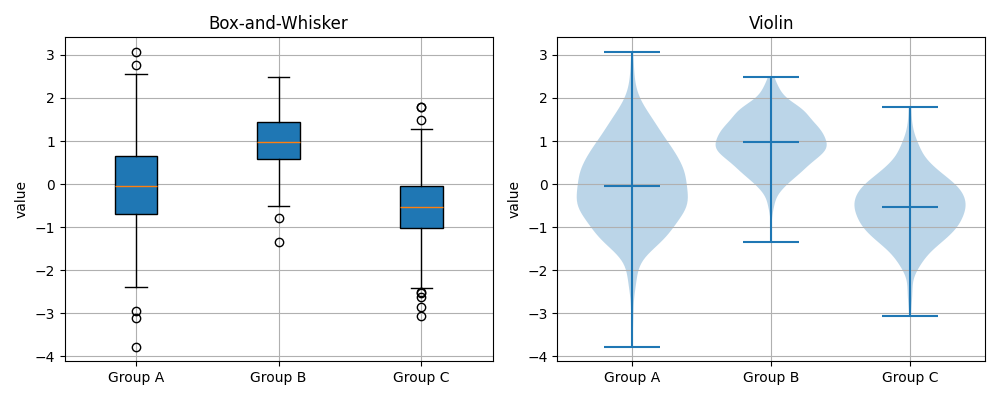
Compare distribution shape with a classic box-and-whisker vs. violin plot.
import numpy as np
import matplotlib.pyplot as plt

from emcpy.plots.plots import BoxandWhiskerPlot, ViolinPlot
from emcpy.plots.create_plots import CreatePlot, CreateFigure

rng = np.random.default_rng(0)
g1 = rng.normal(0.0, 1.0, 400)
g2 = rng.normal(1.0, 0.6, 400)
g3 = rng.normal(-0.5, 0.8, 400)
groups = [g1, g2, g3]
labels = ["Group A", "Group B", "Group C"]

# Left: box-and-whisker
p_left = CreatePlot()
bp = BoxandWhiskerPlot(groups)
bp.tick_labels = labels
bp.patch_artist = True  # filled boxes
p_left.plot_layers = [bp]
p_left.add_title("Box-and-Whisker")
p_left.add_ylabel("value")
p_left.add_grid()

# Right: violin
p_right = CreatePlot()
vp = ViolinPlot(groups)
vp.showmedians = True

p_right.plot_layers = [vp]
p_right.add_title("Violin")
p_right.add_ylabel("value")
p_right.add_grid()
# Keep x tick labels consistent
p_right.set_xticks([1, 2, 3])
p_right.set_xticklabels(labels)

fig = CreateFigure(nrows=1, ncols=2, figsize=(10, 4))
fig.plot_list = [p_left, p_right]
fig.create_figure()
fig.tight_layout()
plt.show()
Total running time of the script: (0 minutes 0.172 seconds)